Ask questions about dedicated servers here and we and other users will do our best to answer them. Please also refer to the self-help section for tutorials and answers to the most commonly asked questions.
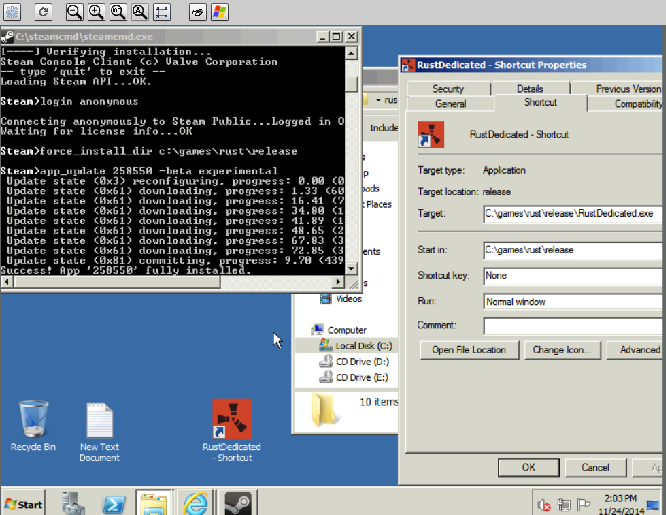
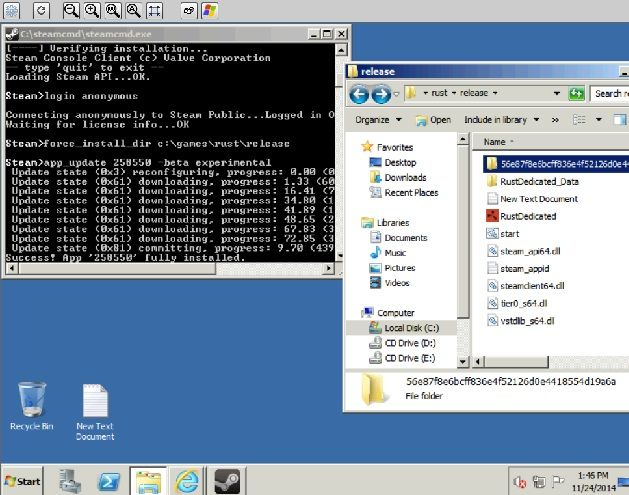
Initiated C:\steamcmd
Files have been downloaded into C:\steam folder.
I logged in as "login anonymous"
I have created a folder in my Cdrive naming it rust
Then typed "force_install_dir C:\rust"
Then typed "app_update_258550 -beta experimental"
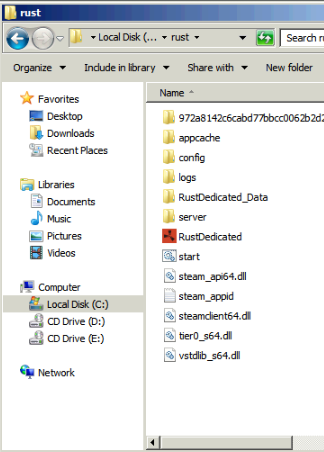
this downloaded the files for rust as follows in this screenshot
I then created a start.bat file by using @echo off
Start /RustDedicated.exe -batchmode -hostname "Nomercykillers" -port 28015 -datadir "save/rust/" -maxplayers 100 -cfg "save/server.cfg" -oxidedir "save/oxide"
Or
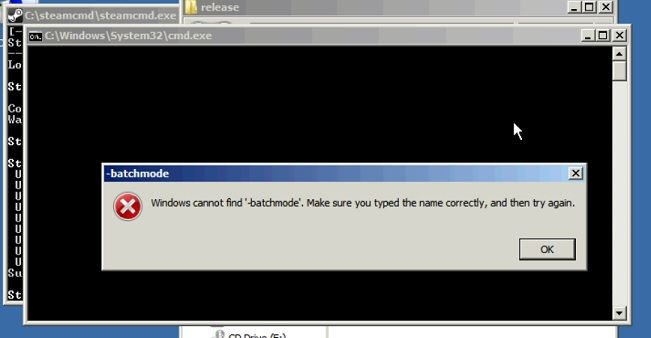
Rustdedicated.exe -batchmode
Double clicking the start bat file after its created i get this message :
Which Rust version are you attempting to run? The current install includes three.
@Kraze^NFo> Juski has a very valid point
@Juski> Got my new signature, thanks!
@Kraze^NFo> Out of context!
@Juski> Doesn't matter!
@Juski> You said I had a valid point! You can't take it back now! It's out there!
Might be something with you logging in anonymously. Do you have an account with Rust on it? If so, try logging in with that. Also your current command line is mostly invalid. It should look something like..
@Kraze^NFo> Juski has a very valid point
@Juski> Got my new signature, thanks!
@Kraze^NFo> Out of context!
@Juski> Doesn't matter!
@Juski> You said I had a valid point! You can't take it back now! It's out there!
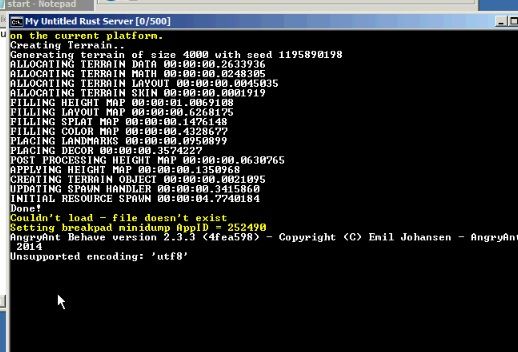
Looking at the screenshot it appears the server was actually working but your command line was just invalid. Try going back to anonymous and using the command line I posted.
@Kraze^NFo> Juski has a very valid point
@Juski> Got my new signature, thanks!
@Kraze^NFo> Out of context!
@Juski> Doesn't matter!
@Juski> You said I had a valid point! You can't take it back now! It's out there!
Granted when launching using the bat file it took about 20 seconds to start.
@Kraze^NFo> Juski has a very valid point
@Juski> Got my new signature, thanks!
@Kraze^NFo> Out of context!
@Juski> Doesn't matter!
@Juski> You said I had a valid point! You can't take it back now! It's out there!
@Kraze^NFo> Juski has a very valid point
@Juski> Got my new signature, thanks!
@Kraze^NFo> Out of context!
@Juski> Doesn't matter!
@Juski> You said I had a valid point! You can't take it back now! It's out there!
I mean create a shortcut via the main exe and add the command line I posted above. Assuming you have correct files it should boot properly.
@Kraze^NFo> Juski has a very valid point
@Juski> Got my new signature, thanks!
@Kraze^NFo> Out of context!
@Juski> Doesn't matter!
@Juski> You said I had a valid point! You can't take it back now! It's out there!
Seems like something in the .bat file is off. To confirm paste that command line into the target window of the Rust shortcut and launch it. If the bat is at fault it should work.
@Kraze^NFo> Juski has a very valid point
@Juski> Got my new signature, thanks!
@Kraze^NFo> Out of context!
@Juski> Doesn't matter!
@Juski> You said I had a valid point! You can't take it back now! It's out there!